Walden
01

Audit Overview

Your store's untapped revenue potential — and how to unlock it

Why We Created This Audit

We analyzed https://waldencase.com the same way we've audited 350+ e-commerce stores — looking for the specific gaps between your current experience and what top-performing Electronics Accessories & Cases stores deliver. Every finding in this report is a revenue opportunity backed by industry data and competitive benchmarks.

2 Critical
8 Important
2 Opportunities

What We Analyzed

  • UX & Conversion Design12 findings
  • Performance & Speedvs 4 competitors
  • Technology & App StackPlatform + 9 apps
  • Industry BenchmarksElectronics Accessories & Cases

Pages Analyzed

  • Homepage2 findings
  • Collection Pages1 findings
  • Product Pages (PDP)4 findings
  • Cart & Checkout5 findings
Growisto This audit was prepared by Growisto — a CRO-led Website development team behind 167% conversion growth for Atomberg, 46% CR lift for TyresNmore, and 350+ e-commerce projects.
02

Performance & Technology

Speed benchmarks, Core Web Vitals, and technology assessment for Walden

44

Mobile PageSpeed Score

Competitive Comparison

Benchmarked against 4 leading Electronics Accessories & Cases stores in your market

Store Mobile Score Desktop Score Mobile LCP Mobile CLS Mobile TBT
Walden (Client)44731.5 s0.000.94 s
Nomad37498.3 s0.010.64 s
Bellroy42621.7 s0.08
Mujjo51502.0 s0.00
Casetify32353.9 s
Good
Needs Improvement
Poor

⚠ Note: Nomad, Bellroy, Casetify score lower than Walden on mobile PageSpeed. This reflects the Electronics Accessories & Cases category average — even established brands in this space struggle with mobile performance. The opportunity is to leapfrog the category, not just match it.

A 1-second delay in mobile load time can reduce conversions by up to 7%. For every 100ms improvement in LCP, conversion rates increase by ~0.4%. Source: Google/Deloitte, 2024

Core Web Vitals — Google's UX Quality Signals

Sites failing Core Web Vitals may rank lower in Google mobile search results

of 5 Core Web Vitals passed
LCP How fast content appears
1474
Target: ≤ 2.5s
FCP First visual response
1218
Target: ≤ 1.8s
TBT Main thread blocking
937
Target: ≤ 200ms
CLS Visual stability
0.0
Target: ≤ 0.1
INP Tap/click responsiveness
N/A
Target: ≤ 200ms
N/A

What This Means for Revenue

On real-user field data (Chrome UX Report), Walden's storefront is strong across the board — LCP, FCP, INP and CLS all sit in Google's GOOD band, so shoppers get a fast, visually stable experience. On Lighthouse lab tests (a worst-case cold load) Walden posts the best desktop score in the benchmark set (73, ahead of Bellroy 62, Mujjo 50, Nomad 49 and Casetify 35) and the second-best mobile score (44, behind only Mujjo's 51 and ahead of Bellroy, Nomad and Casetify). The one clear opportunity is mobile main-thread work: total blocking time (0.94 s) is high, though this is an industry-wide pattern for image- and script-heavy accessory stores (Nomad shows the same profile). Trimming third-party scripts and deferring non-critical JS would lift the mobile lab score while the real-user baseline is already excellent.

Technology Stack

⚠ 4 of 6 technology areas are well-configured — theme toolbar and express checkout need attention
Modern Platform

Platform

Shopify

Auto-scaling, PCI-compliant hosting with native checkout, cart drawer, and Shopify Inbox chat already wired in.

OS 2.0 Theme, Misconfigured Toolbar

Theme

Focal

  • Type: Shopify Online Store 2.0 theme ("Focal [ DO NOT EDIT ]")
  • Focal theme, OS 2.0 section-based architecture
  • Mobile filter/sort toolbar exists in the theme but is inline-styled to display:none sitewide (see collection finding)
Native

Checkout & Payments

Native Shopify Checkout via Shopify Payments + Mercado Pago

  • Guest checkout: Available via native Shopify checkout, no third-party override detected.
  • Express checkout: No Shop Pay / Google Pay / Apple Pay dynamic checkout button detected on PDP or cart — only the standard Checkout button.
  • Visa, Mastercard, Amex, Diners (via Shopify Payments), Mercado Pago integration detected (fingerprint iframe)

Technology Assessment

Walden runs on Shopify with the Focal OS 2.0 theme and native Shopify checkout — a clean, low-risk technical foundation. The two gaps found are both configuration issues rather than platform limitations: the theme's own mobile filter/sort toolbar is present in the DOM but hidden via inline CSS across every collection page, and no express/accelerated checkout button (Shop Pay, Google Pay) is enabled despite a broad card-payment and Mercado Pago setup already in place. Both are fixable within the existing stack without a platform or theme migration.

03

UX & Conversion Findings

Page-by-page analysis with visual comparisons against top Electronics Accessories & Cases stores
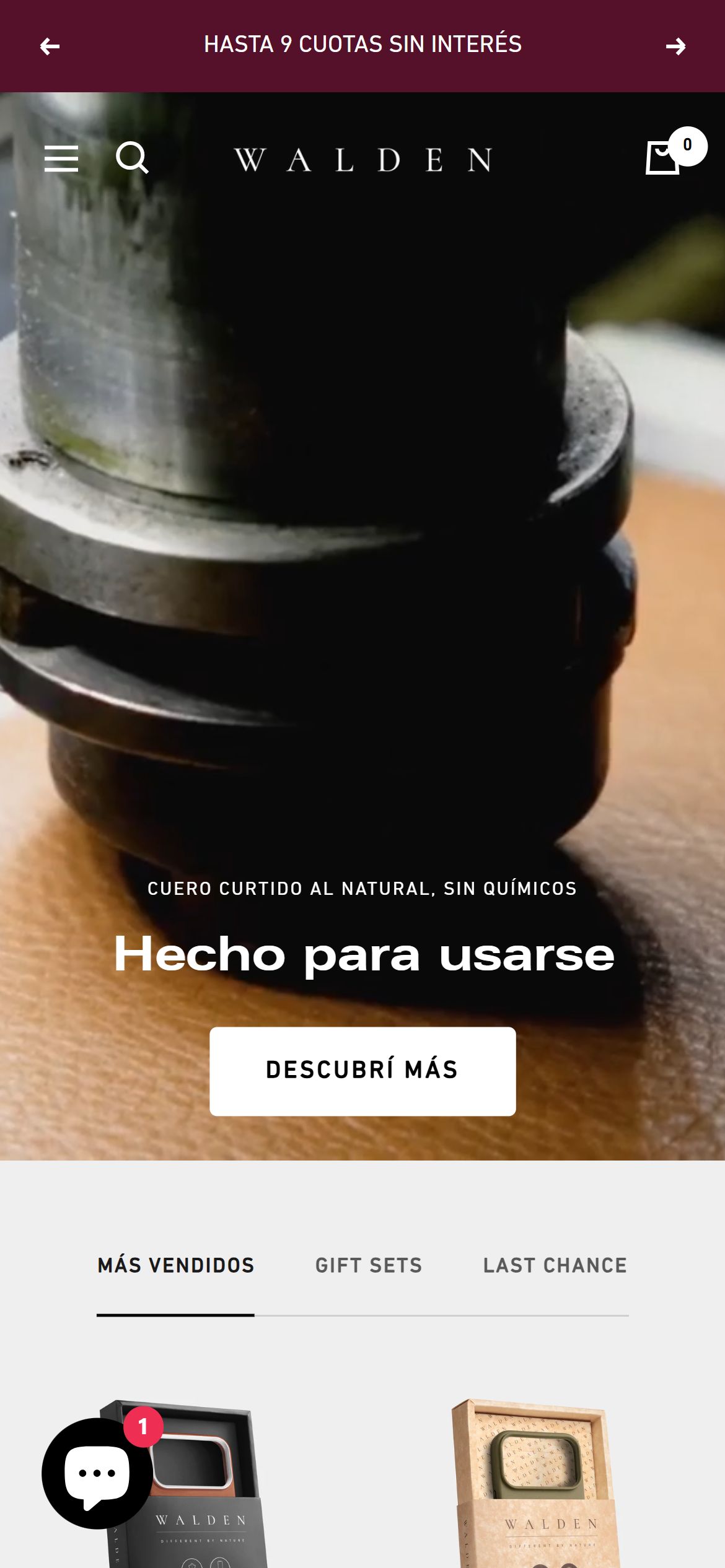
Add a trust and USP icon strip near the top of the homepage so shoppers see shipping, warranty and returns promises at a glance
Walden — Mobile
Walden — Mobile
Proposed Implementation — Walden
Observations
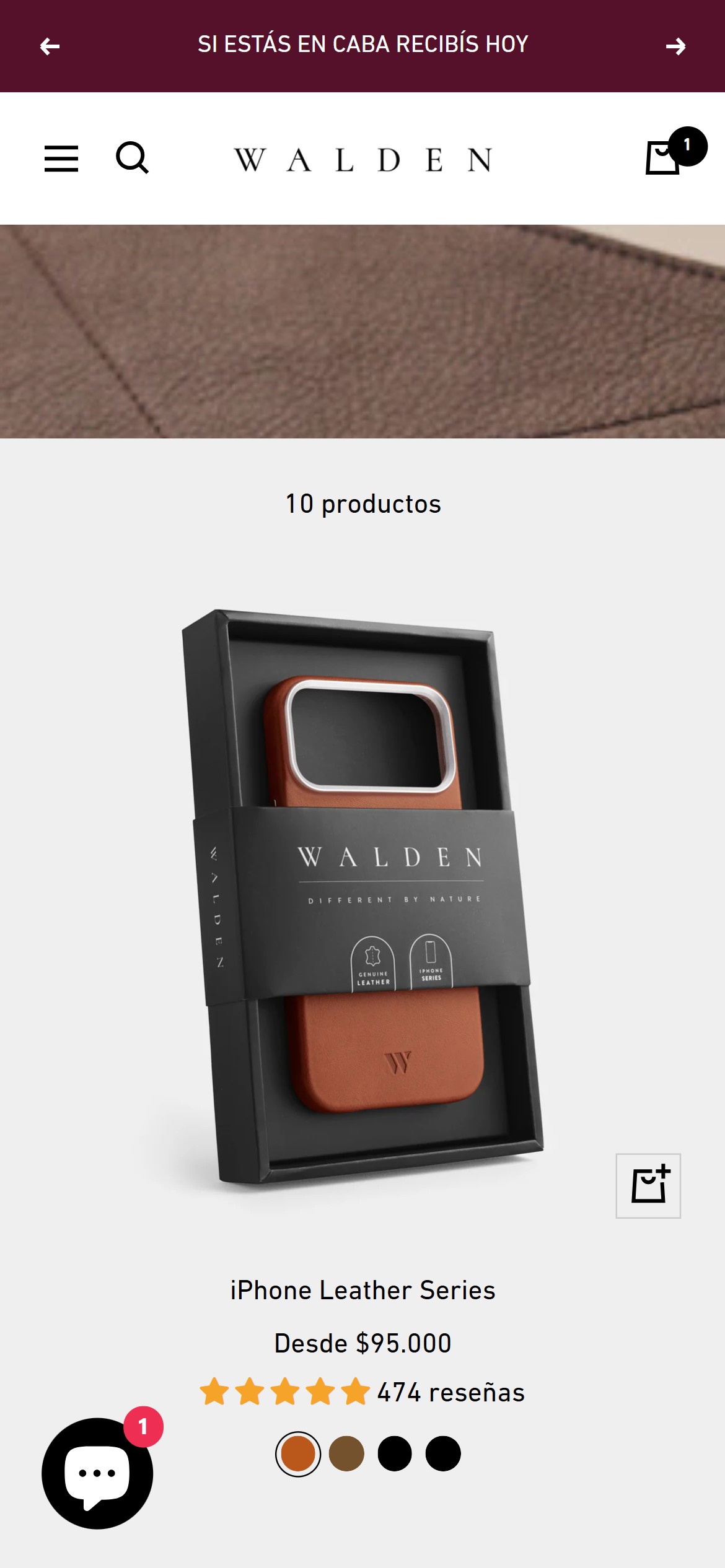
  • The homepage's only above-the-fold value message is the rotating announcement bar ("ENVÍO GRATIS A CABA", "HASTA 9 CUOTAS SIN INTERÉS") — a text-only banner, not an iconographic trust/USP strip a shopper can scan at a glance.
  • A full-page DOM scan found no dedicated trust-badge row (no free-shipping, warranty, returns, or secure-payment icon group) between the hero and the product tabs.
  • The brand's genuine reassurances — "Garantía Exclusiva", "Cambios", "Medios de Pago y Envío" — exist only as text links in the footer, where most mobile shoppers never scroll.
  • For a premium, sustainability-led brand, surfacing these reassurances high on the page reinforces the price positioning before the shopper reaches a product.
Recommendations
  • Add a compact icon-plus-label USP strip directly below the hero (e.g., Envío gratis a CABA · Cuotas sin interés · Garantía Walden · Cambios fáciles · Pago seguro) using simple line icons.
  • Keep it visible on mobile as a horizontal scroll or two-row grid so every promise is reachable without opening the footer.
Standard tier pattern for homepage trust signaling
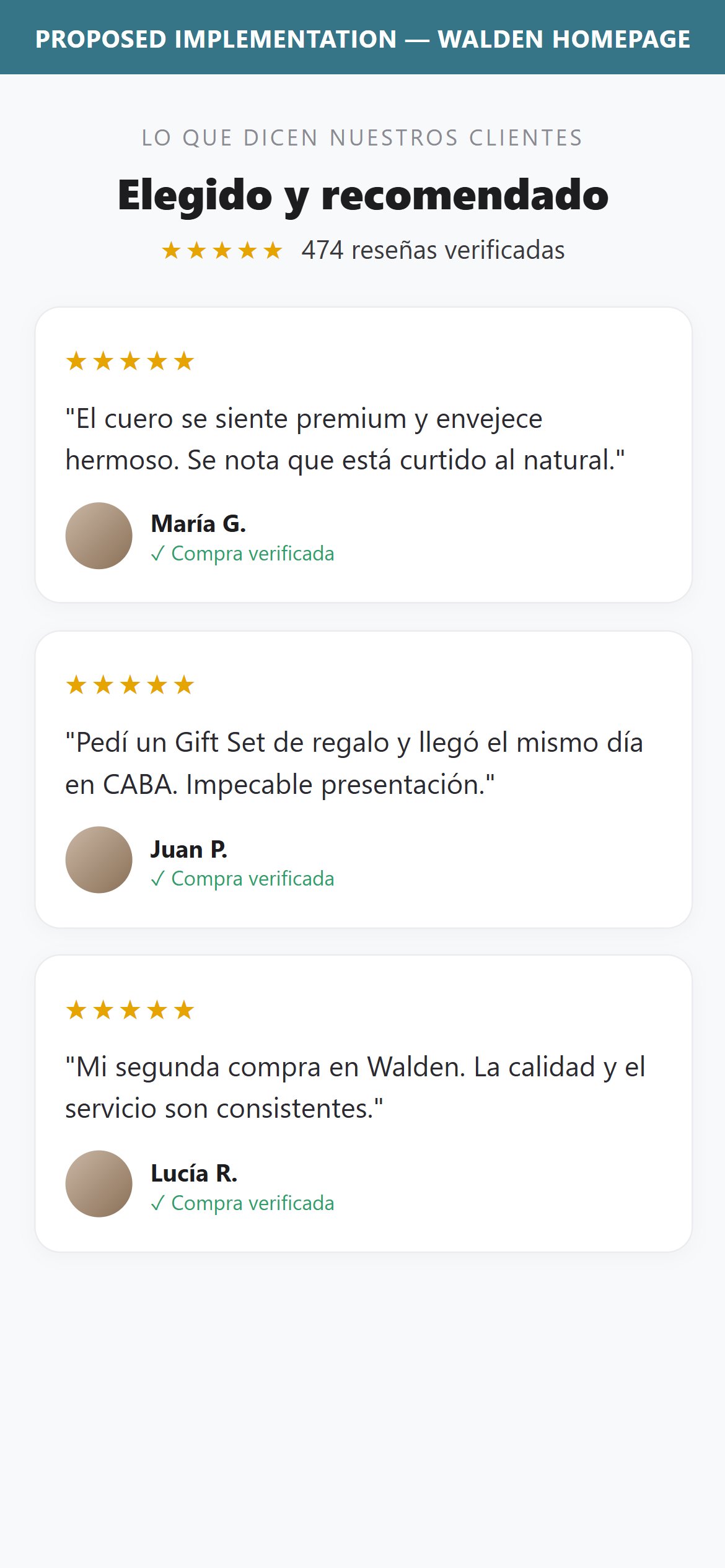
Add a customer testimonials section to the homepage so first-time visitors see real buyer voices, not just star counts on cards
Feature not present
Walden — Not Present
Proposed Implementation — Walden
Observations
  • The homepage flows from the hero into product tabs, a Gift Sets promo, flagship-store locations and the newsletter signup — there is no section that features actual customer testimonials or review quotes.
  • Product cards do surface per-product star ratings and review counts, and the brand collects reviews via Judge.me (the hero Gift Set carries 474 reviews) — but that voice never appears as named customer quotes a first-time visitor can connect with.
  • A shopper forming a first impression sees ratings-as-numbers but no human story or quoted experience to build brand trust before they start browsing.
Recommendations
  • Add a testimonials section to the homepage — a short carousel of real Judge.me review quotes with the reviewer's name and star rating.
  • Source it from the existing Judge.me review pool so the section stays authentic and refreshes automatically.
Standard tier pattern for homepage social proof
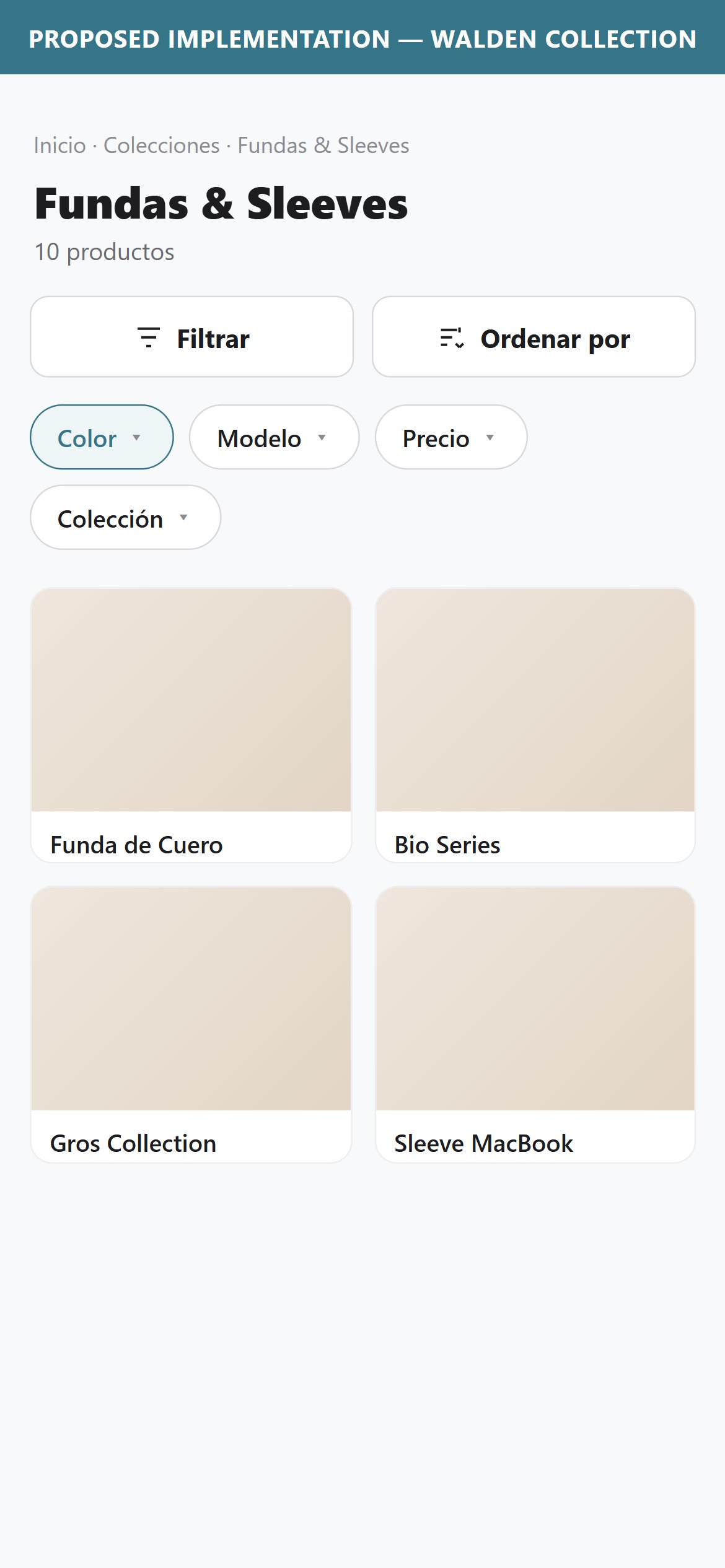
Restore the hidden filter and sort toolbar so shoppers can narrow the collection by color or price
Walden — Mobile
Walden — Mobile
Proposed Implementation — Walden
Observations
  • The mobile facet toolbar (`#mobile-facet-toolbar`) is present in the DOM on every collection page checked, but both its "Filtrar" and "Ordenar por" buttons carry an inline `style="display:none"` and the toolbar itself renders at 0px height — shoppers have no visible way to filter or sort.
  • Directly under the collection banner, the only element visible is a plain product count ("10 productos") with no filter chip, no sort dropdown, and no price-range control next to it.
  • This is not a catalog-size issue — the same hidden toolbar exists on every collection checked (Cases & Sleeves: 10 products, iPhone Cases: 4 products), confirming a sitewide theme misconfiguration rather than an intentional design choice.
  • Shoppers arriving with a specific need (a color, a device model, a price ceiling) must manually scroll and scan every card instead of narrowing the list.
Recommendations
  • Remove the inline `display:none` on `.mobile-toolbar__item--filters` and `.mobile-toolbar__item--sort` (or the theme setting driving it) so the existing filter/sort toolbar renders on mobile.
  • Once visible, add at minimum color and device-model filters plus a price sort, matching the swatch and price data already present on each product card.
Standard tier pattern for multi-variant accessory catalogs
Add a sticky Add to Cart bar so shoppers can buy the Gift Set without scrolling back up past reviews and cross-sell
Walden — Mobile
Walden — Mobile
Proposed Implementation — Walden
Observations
  • Scrolling from the inline "LO QUIERO" button through the description, accordion sections (Detalles, Cuidado del cuero, Reseñas), shipping/warranty links, and the 474-review Judge.me widget, no fixed purchase bar ever appears at the bottom of the viewport.
  • The PDP for this Gift Set is long by design — 9 image slides, a full description, three accordions, and a large reviews module — meaning most of the scroll depth has zero access to a buy action.
  • The only path back to purchase is scrolling all the way up to the original inline button, adding friction on exactly the page type (a premium multi-item gift set) where impulse-to-purchase distance matters most.
  • This matches a category-wide pattern: sticky ATC is still an emerging (not yet standard) practice in electronics accessories, but its absence is most costly on high-AOV, long-scroll PDPs like this one.
Recommendations
  • Add a fixed bottom bar that appears once the inline ATC scrolls out of view, showing product thumbnail, price, and an "Agregar" action.
  • Hide the sticky bar again when the inline ATC is back in view to avoid duplicate CTAs on shorter PDPs.
Differentiator tier pattern, highest-value on long-scroll or high-AOV PDPs
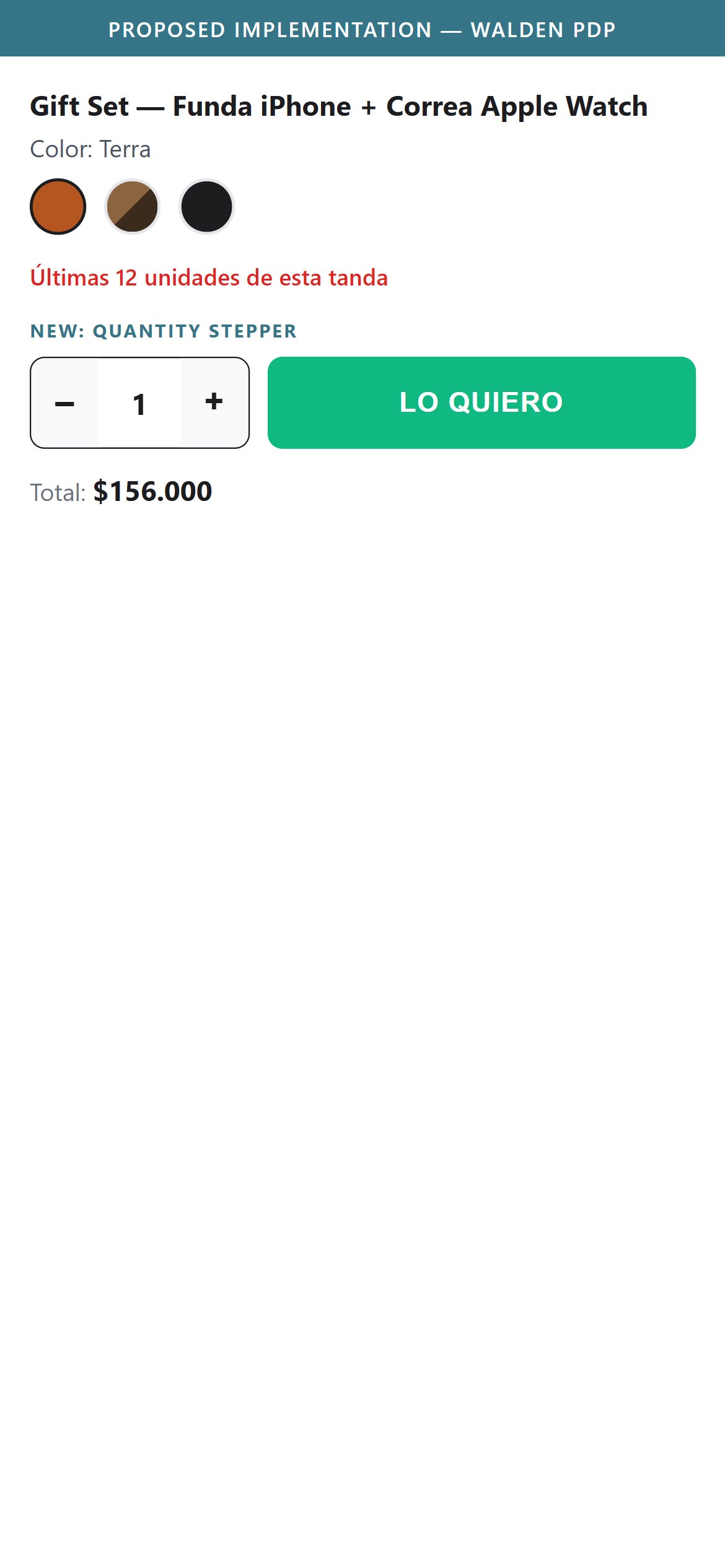
Add a quantity stepper next to Add to Cart so gift-buyers can order multiples of a set in one step
Walden — Mobile
Walden — Mobile
Proposed Implementation — Walden
Observations
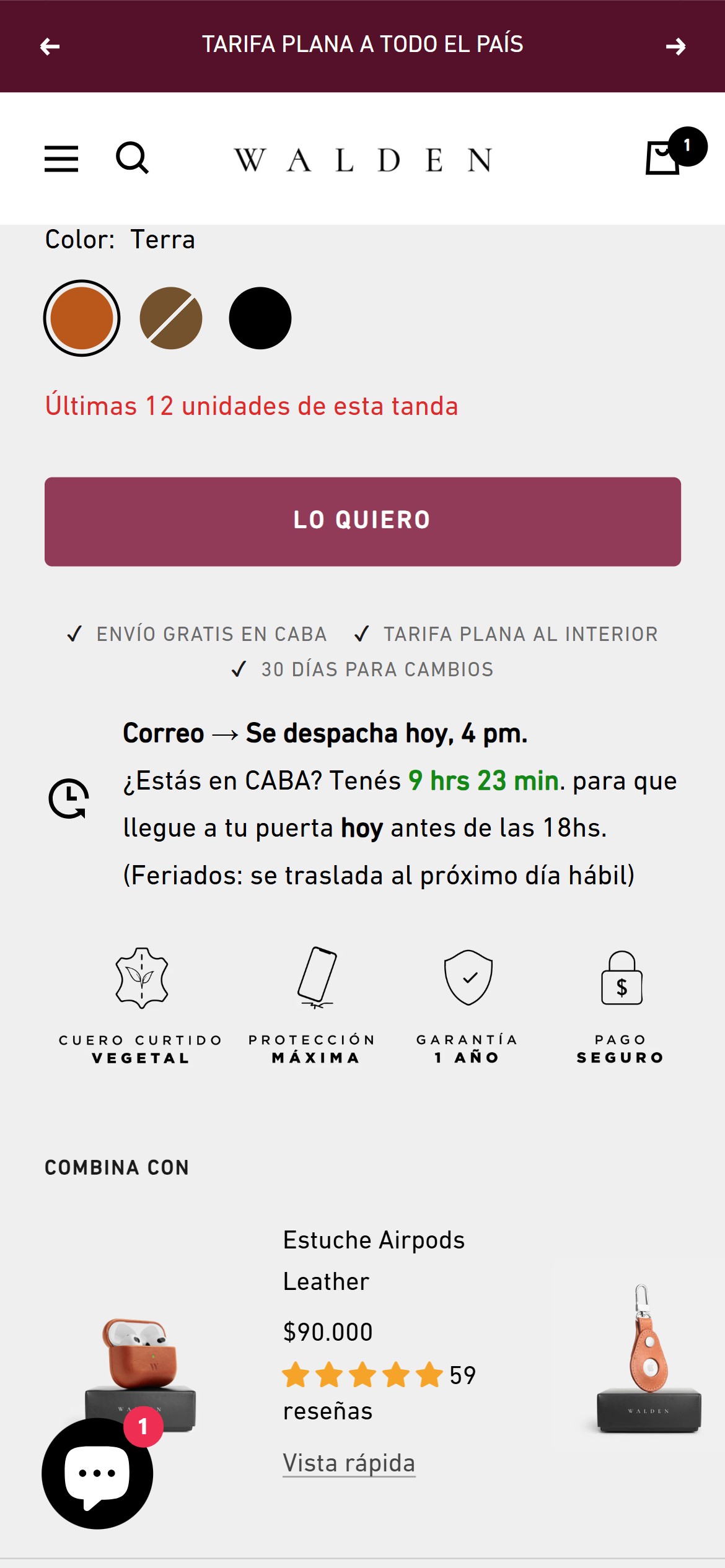
  • The purchase zone on the PDP shows color swatches, a scarcity line ("Últimas 12 unidades de esta tanda"), and the single "LO QUIERO" button — there is no +/- stepper or quantity field anywhere near it.
  • A shopper who wants two Gift Sets (e.g., for two gifts) has to add the item once, then adjust quantity only after reaching the cart drawer — an extra step that isn't obvious since the cart drawer opens automatically on the first add.
  • This is a gifting-forward brand (dedicated Gift Sets tab, gift-wrap-style packaging shown in product photography) — multi-unit purchase intent is plausible and currently unsupported at the point of decision.
Recommendations
  • Add a quantity stepper directly beside or below the Add to Cart button on every PDP.
  • Default to 1 but make the stepper immediately visible, matching the prominence of the color/model selectors above it.
Growing tier pattern for gifting-forward accessory PDPs
Add a Buy Now button beside Add to Cart to cut checkout steps for same-day CABA delivery shoppers
Walden — Mobile
Walden — Mobile
Proposed Implementation — Walden
Observations
  • The only purchase action on the PDP is "LO QUIERO" (Add to Cart) — there is no secondary "Comprar ahora" / express-checkout button that would skip the cart step entirely.
  • The PDP already sells urgency hard (a live countdown for same-day CABA delivery, "Últimas 12 unidades de esta tanda") — but a shopper who is ready to buy immediately still has to go through the cart drawer before reaching checkout.
  • No dynamic checkout button (Shop Pay/Google Pay/Apple Pay-style) renders in the purchase zone either, so every purchase path funnels through the same single button and an extra cart-review step.
Recommendations
  • Enable Shopify's dynamic checkout button (Shop Pay / accelerated checkout) on the PDP so it appears alongside the standard Add to Cart action.
  • Prioritize this on high-urgency PDPs like same-day-delivery-eligible gift sets, where the countdown messaging is already pushing for a fast decision.
Growing tier pattern for premium DTC accessory brands
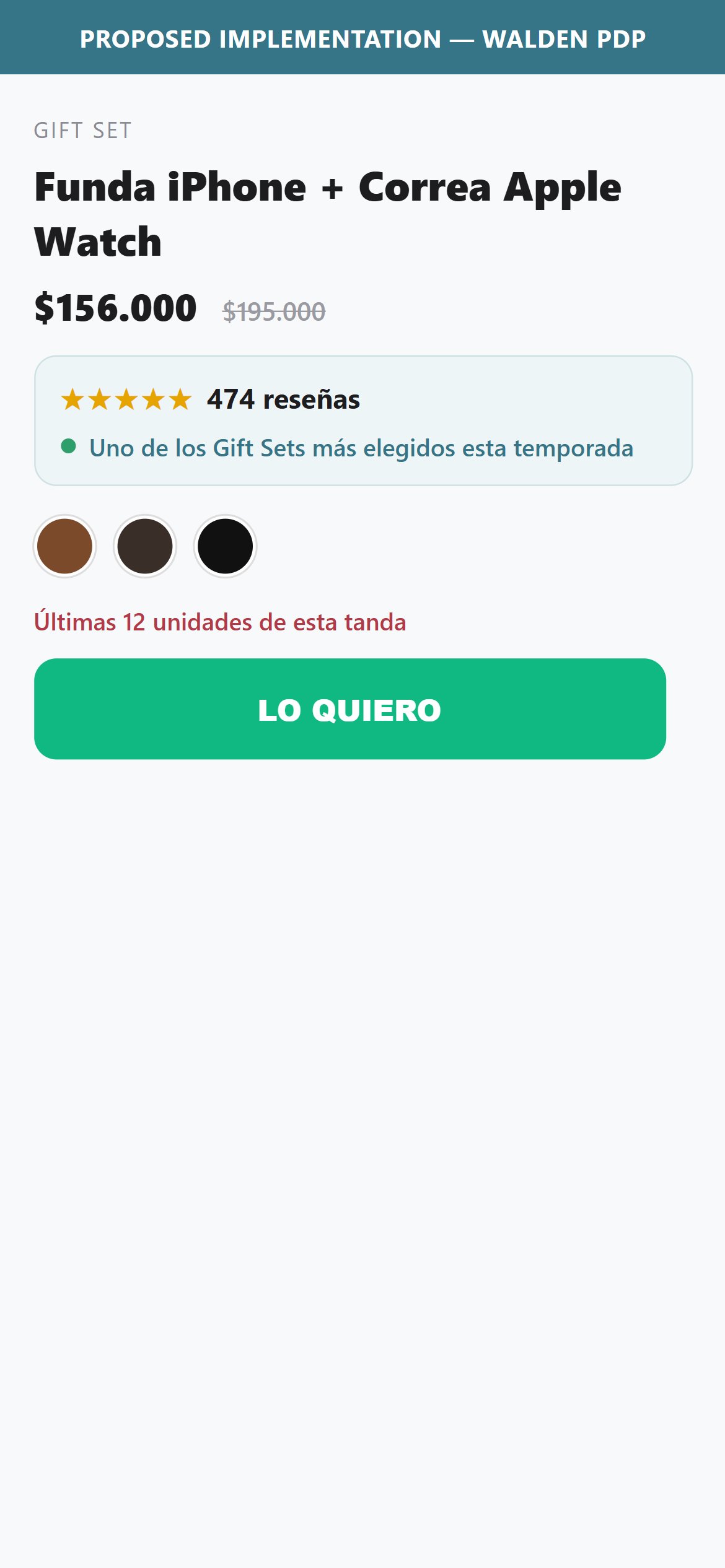
Surface social proof next to Add to Cart so shoppers see the Gift Set is trusted and actively chosen at the moment of decision
Walden — Mobile
Walden — Mobile
Proposed Implementation — Walden
Observations
  • The purchase zone shows color swatches, a scarcity line ("Ultimas 12 unidades de esta tanda") and the "LO QUIERO" button — but no social-proof cue signalling the product is trusted or actively bought.
  • The Gift Set's 474 reviews sit far below the fold in the Judge.me widget; none of that trust is surfaced next to the buy button where the purchase decision is made.
  • The shopper at the decision point sees urgency (low stock) but no reassurance that other customers have chosen and rated this product.
Recommendations
  • Surface a compact social-proof cue in the purchase zone — the aggregate star rating and review count pulled from Judge.me, and/or a tasteful recent-activity indicator driven by real order data.
  • Keep it authentic and on-brand so it complements the existing scarcity line rather than reading as a gimmicky counter.
Growing tier pattern for PDP social proof
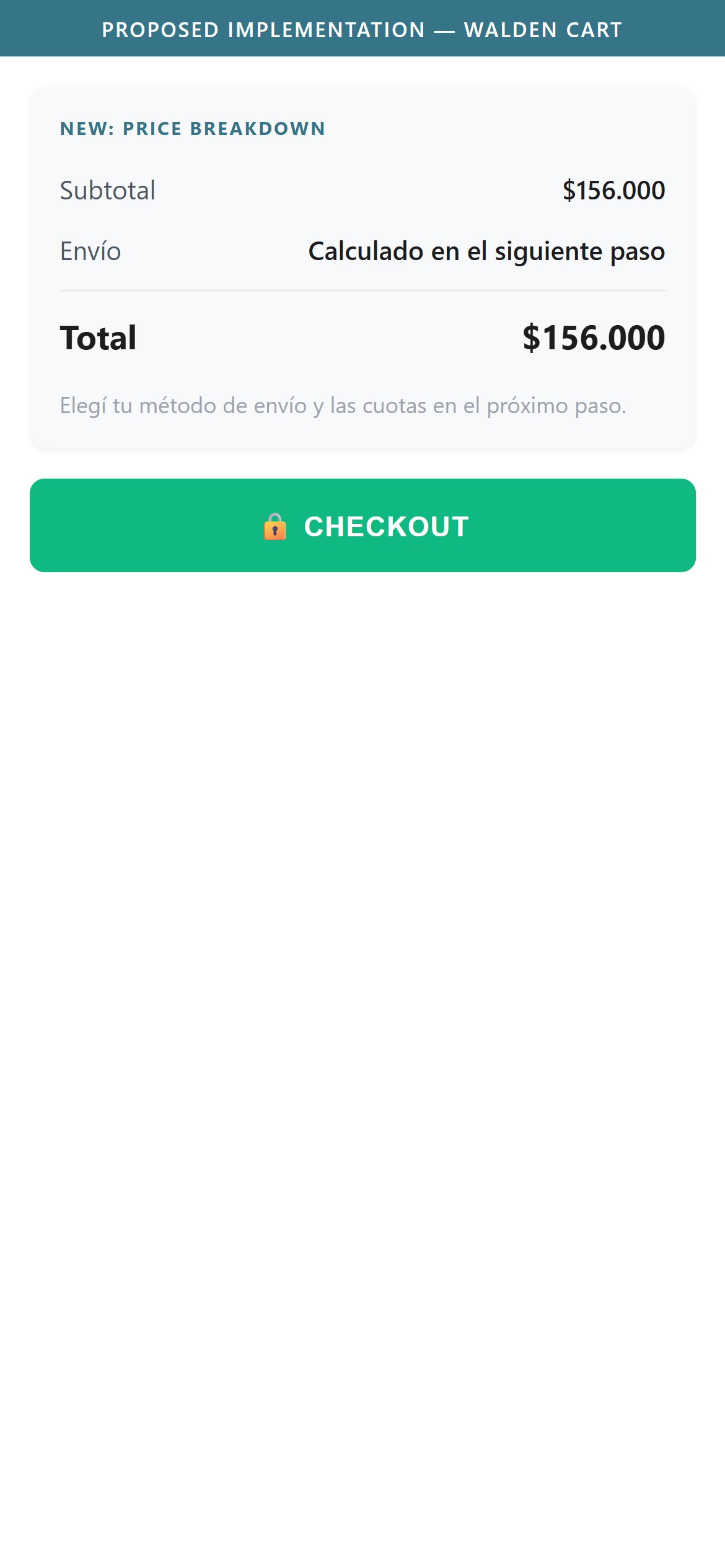
Show a subtotal and shipping line above the total so shoppers see the cost breakdown before reaching checkout
Walden — Mobile
Walden — Mobile
Proposed Implementation — Walden
Observations
  • Both the cart drawer and the full /cart page show only a single "Total: $156.000" line — there is no subtotal, no shipping line, and no tax line above it.
  • Shipping cost is deferred entirely to checkout ("Elegí tu método de envío y las cuotas en el próximo paso"), which means the cart total shown is not actually the final total — it may change at the next step.
  • For an order at this price point, shoppers scanning the cart for a cost breakdown before committing to checkout have nothing to review beyond the flat total.
Recommendations
  • Add a subtotal line and a shipping line (even if shipping shows "Calculado en el siguiente paso") above the total in both the cart drawer and the /cart page.
  • Keep the breakdown format consistent between drawer and full cart page so the two experiences match.
Standard tier pattern for cart summary structure
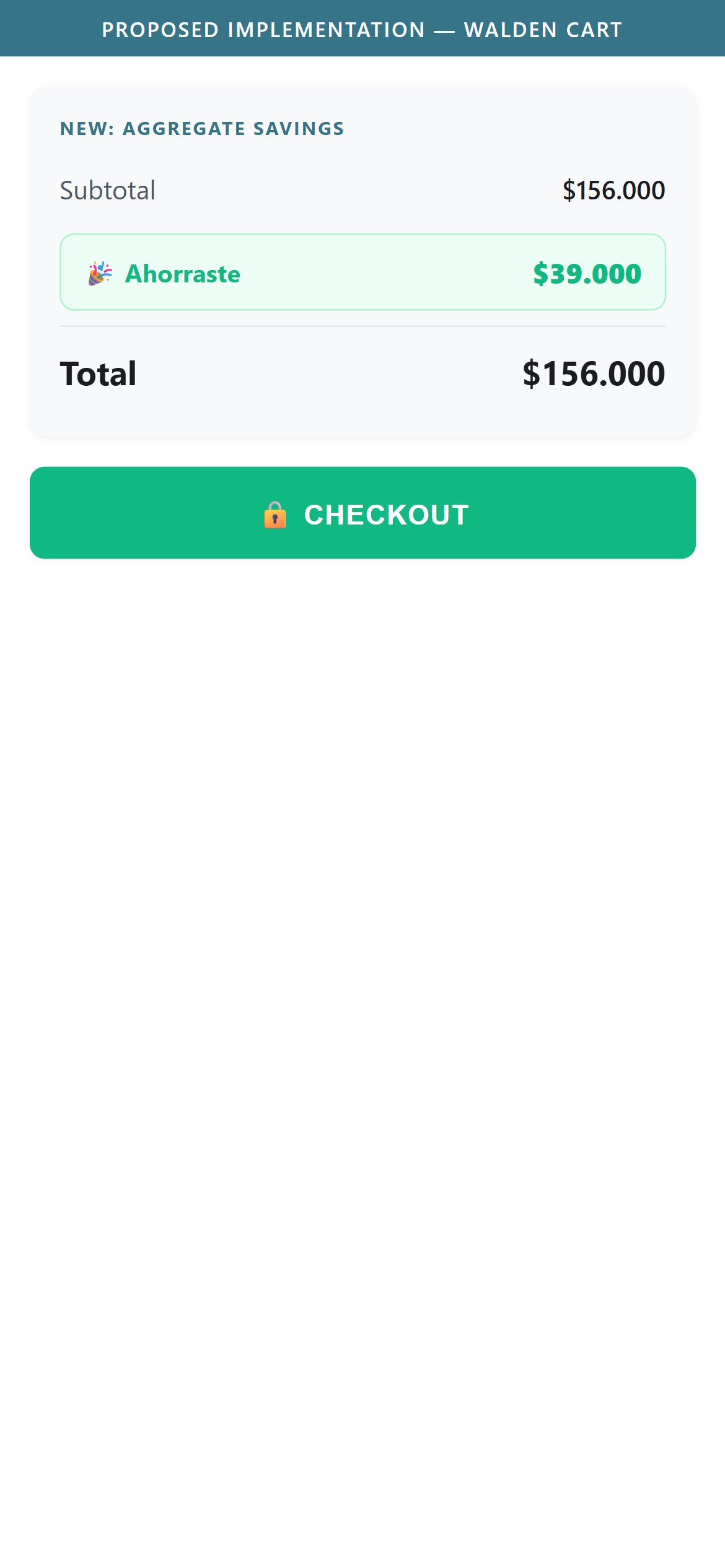
Display total amount saved in the cart summary to reinforce the Gift Set discount already applied
Walden — Mobile
Walden — Mobile
Proposed Implementation — Walden
Observations
  • The cart line item shows the discounted price ($156.000) with the original price struck through ($195.000), but the cart summary never adds up and surfaces the total amount saved across the order.
  • The PDP itself calls out the discount clearly (an "AHORRÁ" savings badge and "Ahorrá ... con la compra de este Gift Set" in the description) — that same value story disappears once the shopper reaches the cart.
  • Reinforcing savings at the cart stage, right before checkout, is a low-effort way to justify the spend on a $156,000 ARS purchase.
Recommendations
  • Add a "Ahorraste $39.000" (or equivalent aggregate) line in the cart order summary, calculated from the sum of per-item discounts.
  • Style it distinctly (e.g., green text) so it stands out from the subtotal/total lines.
Growing tier pattern for discount-led cart summaries
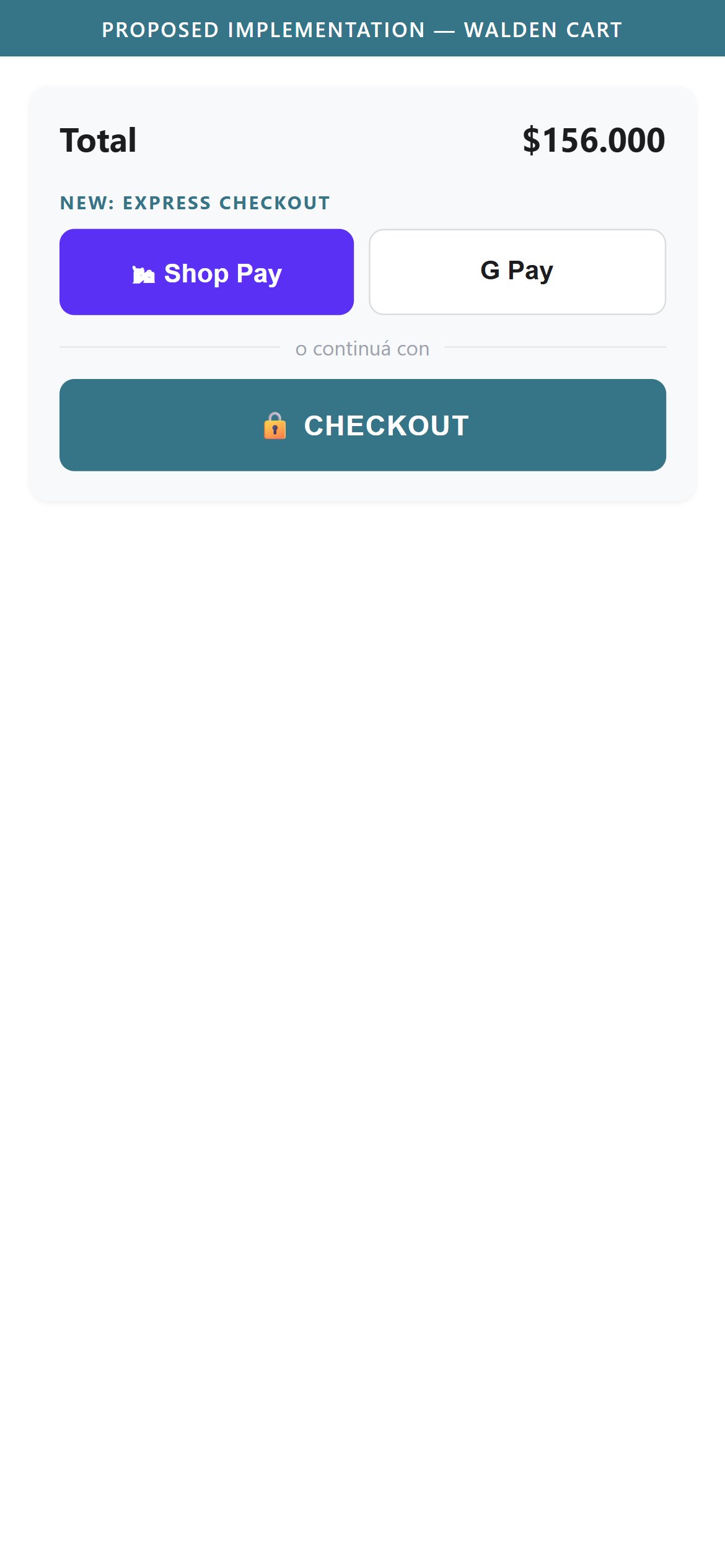
Add express checkout buttons like Shop Pay or Google Pay to cut steps for same-day CABA delivery shoppers
Walden — Mobile
Walden — Mobile
Proposed Implementation — Walden
Observations
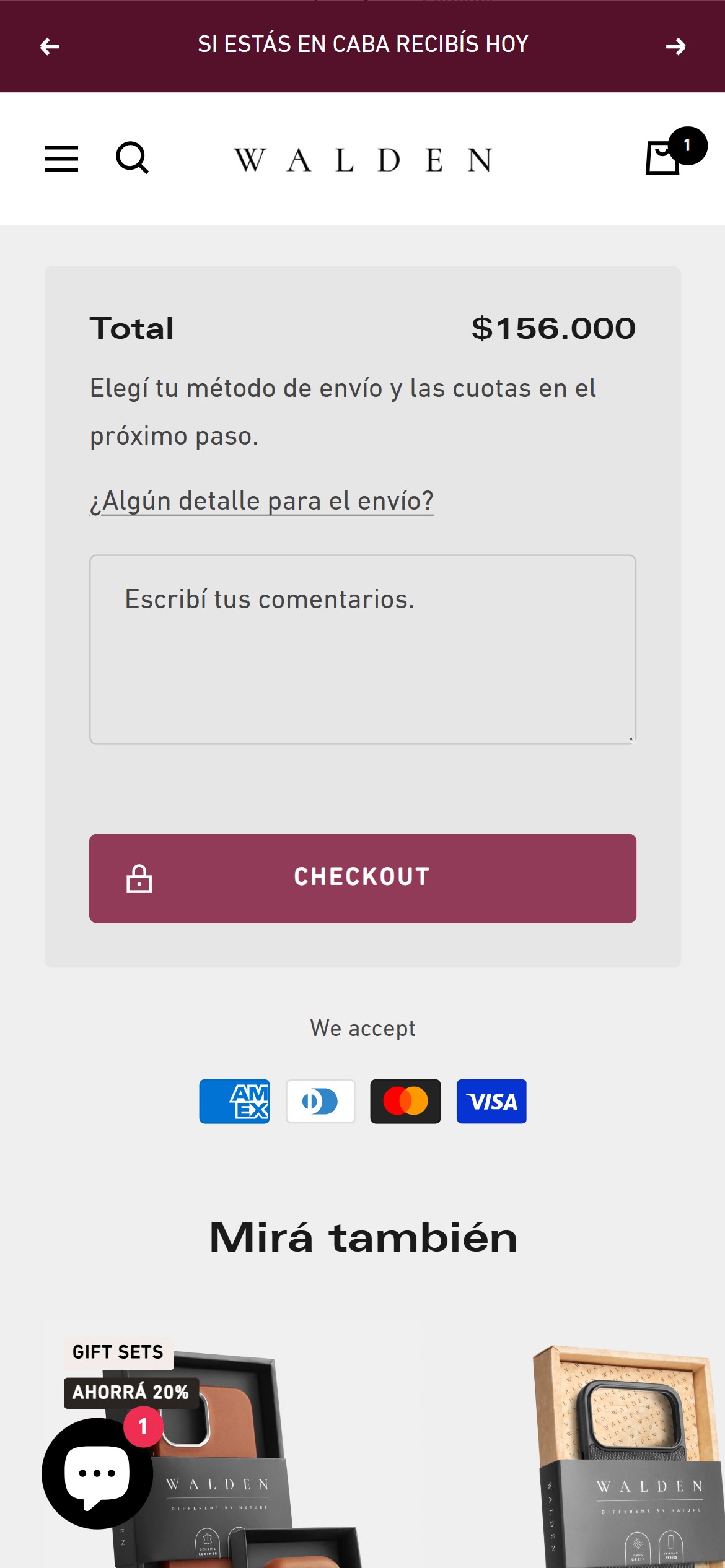
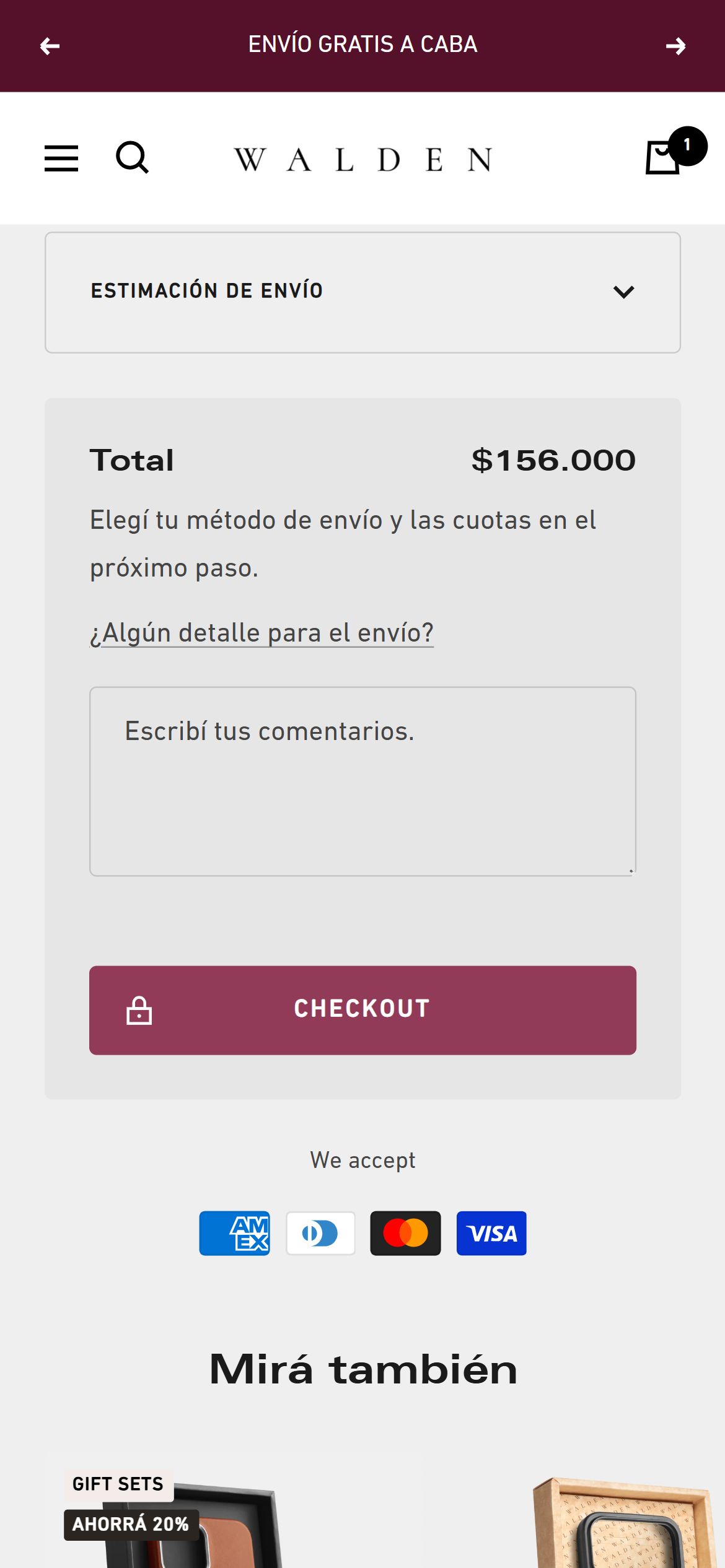
  • Both the cart drawer and the /cart page show a single "CHECKOUT" button (with a lock icon) as the only path to purchase — no Shop Pay, Google Pay, or other one-click express option appears above or below it.
  • The checkout button leads to a standard multi-field checkout flow, which adds friction for returning mobile shoppers who have saved payment details in their device wallet.
  • This gap sits directly beside the accepted-payment-methods row (Amex, Diners, Mastercard, Visa), which shows card support is broad — express wallet checkout would be a natural extension of that existing payment breadth.
Recommendations
  • Enable Shopify's accelerated checkout buttons (Shop Pay, Google Pay) so they render above the standard Checkout button in both the drawer and full cart page.
  • Test wallet checkout on the same-day CABA delivery flow specifically, since that segment is most time-sensitive.
Growing tier pattern for premium DTC checkout flows
Add a collapsed promo code field to the cart so first-time visitors can redeem the signup offer promised on the homepage
Walden — Mobile
Walden — Mobile
Casetify — Mobile
Casetify — Mobile
Observations
  • Neither the cart drawer nor the /cart page has a visible field for entering a promo/discount code — the only free-text field present is a shipping-instructions comment box.
  • Walden actively promotes a first-purchase coupon via the homepage and PDP newsletter popups ("... off en tu primera compra") — a shopper who signed up for that offer has no on-cart way to apply it before checkout.
  • Without a coupon field, that shopper either abandons the cart to search for where to apply the code, or discovers the field only exists later in the checkout flow, adding uncertainty at exactly the point that should feel frictionless.
Recommendations
  • Add a "¿Tenés un cupón?" collapsed link in the cart that expands into a code field, keeping the cart visually clean by default.
  • Cross-reference this with the signup popup so the coupon-application step feels like a natural continuation of the offer already promised.
Standard tier pattern for coupon-code accessibility
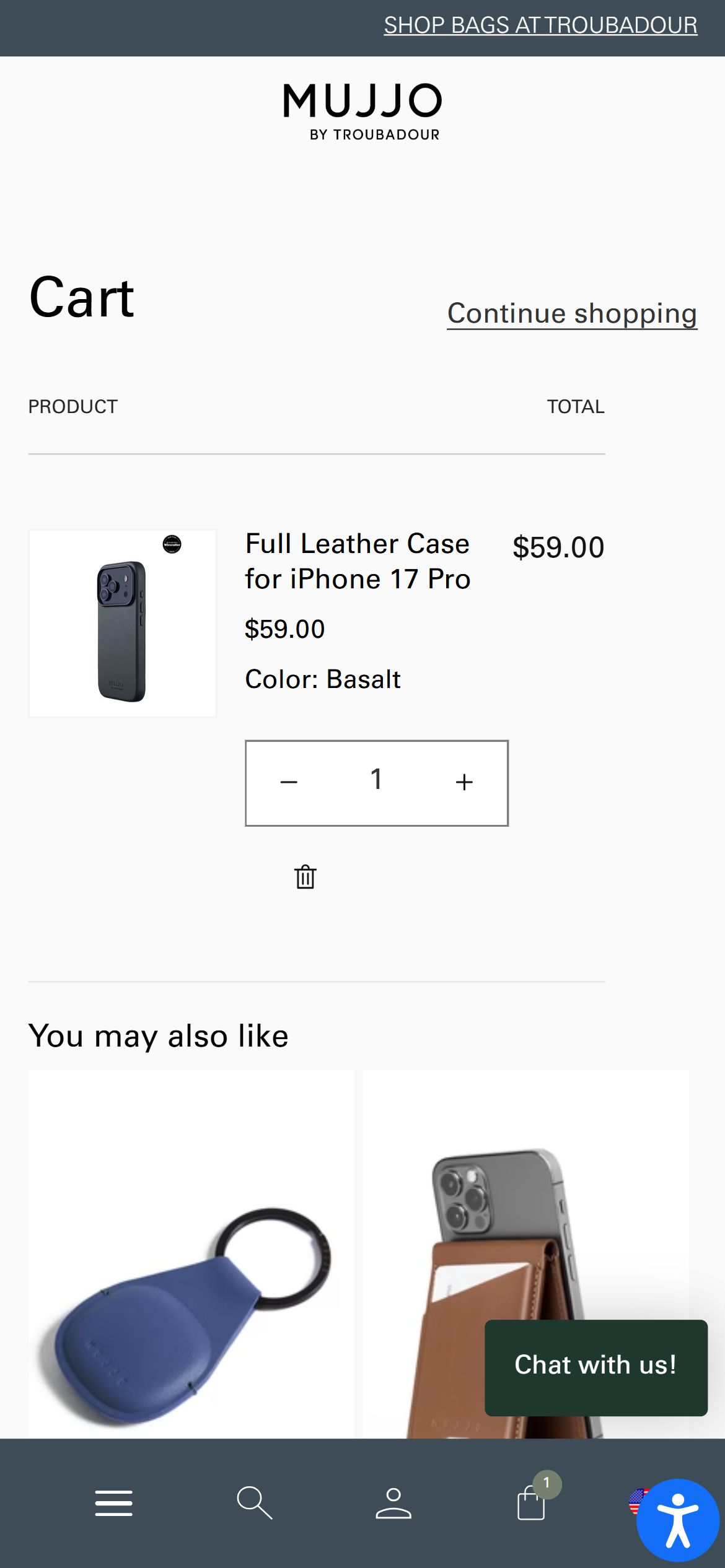
Add a 1-tap Continue Shopping link on the full /cart page so shoppers who land there directly can return to browsing
Walden — Mobile
Walden — Mobile
Mujjo — Mobile
Mujjo — Mobile
Observations
  • The full /cart page (reached via the cart icon or a direct /cart link) ends with the checkout button, payment icons, and a "Mirá también" recommendation carousel — there is no explicit "Seguir comprando" link back to the store.
  • The cart drawer version of this experience has an implicit continue-shopping path (closing the drawer returns to the underlying page), but the full-page cart has no equivalent — the only way back is the browser back button or the header navigation.
  • This gap is minor on its own but compounds with the missing filter/sort bar (finding cp_f1): a shopper who lands on /cart after browsing has no direct, low-effort path back into the catalog.
Recommendations
  • Add a visible "Seguir comprando" text link near the top or bottom of the full /cart page that returns to the homepage or last-viewed collection.
  • Keep it visually secondary to the Checkout button so it doesn't compete with the primary conversion action.
Standard tier pattern for cart page navigation
04

App Ecosystem

What's installed vs what's missing from best-in-class Electronics Accessories & Cases stores
9 Apps
Detected
4 Critical Categories
Missing
Walden's stack is lean and purpose-built rather than over-tooled: reviews, email, chat, and analytics are all covered by solid, well-configured tools. The gaps are less about missing apps and more about missing configuration (express checkout) and a couple of retention-stage tools (wishlist, loyalty, order tracking) that would suit its multi-category, gifting-forward catalog.

Present (9)

Judge.me Reviews
Reviews & Social Proof
Full star-rating display, verified badges, and customer photo gallery on PDP; ratings also surface on homepage and collection product cards.
Klaviyo
Email & SMS Marketing
Powers the newsletter signup with a 15% first-purchase coupon incentive, present on homepage, PDP, and collection pages.
Shopify Inbox
Live Chat & Support
Native Shopify chat widget active site-wide (visible chat bubble on every page checked).
Mercado Pago
Payments (AR Market)
Integrated alongside Shopify Payments — standard for the Argentina market.
Google Tag Manager + GA4
Analytics
GTM container and a GA4 property firing; a second GT- tag ID also detected, worth auditing for duplication.
Meta Pixel
Analytics / Ads
Facebook/Meta signals config and fbevents.js both loading.
Microsoft Clarity
Analytics & Heatmaps
Session recording/heatmap script active.
Hotjar
Analytics & Heatmaps
Running alongside Microsoft Clarity — likely redundant heatmap/session-recording coverage; consolidating to one tool would reduce third-party script weight.
Native Shopify Search & Predictive Search
Search & Filter
Fully functional predictive search with rich results (image, title, price) confirmed in this audit — no third-party search app needed at this catalog size.

Missing (4)

Wishlist / Save for Later App Recommended
Retention & Personalization
🔄 Return-visit rate uplift
Common on premium accessory DTC sites with multi-item catalogs and a gifting use case
Order Tracking App (AfterShip / Parcel Panel) Recommended
Post-Purchase Experience
✨ Reduced WISMO support tickets
Standard for DTC brands offering same-day and multi-day delivery windows like Walden's CABA vs. interior tiers
Loyalty / Rewards Program (Smile.io or similar) Nice-To-Have
Customer Retention
🔄 Repeat purchase incentive for a multi-category catalog (cases, straps, wallets, sleeves)
Natural fit given Walden's cross-sell already encourages multi-category baskets (Gift Sets, "Combina con")
Accelerated / Express Checkout (Shop Pay, Google Pay) Critical
Checkout Optimization
📈 Fewer checkout steps for time-sensitive same-day delivery shoppers
Native Shopify feature, not a third-party app — currently disabled despite broad card + Mercado Pago support already in place

App Stack Assessment

Walden runs a focused app stack: Judge.me for reviews, Klaviyo for email capture with an active coupon incentive, native Shopify Inbox for chat, and a healthy analytics layer (GTM, GA4, Meta Pixel, Clarity, Hotjar). The one redundancy worth flagging is running both Clarity and Hotjar for session recording. The more actionable gap is checkout: Shopify's own accelerated checkout button (Shop Pay / Google Pay) is not enabled, despite full card and Mercado Pago payment coverage already being in place — this is a configuration fix, not a new app to install.

1 / 1